Last updated · 2 min read
How to post a PDF on Instagram as an image carousel
Slide decks, reports, menus and posters often live as PDFs, while social platforms like Instagram only accept images and video. Converting each page into a JPG lets you post the document as a swipeable carousel.
Export the pages as images
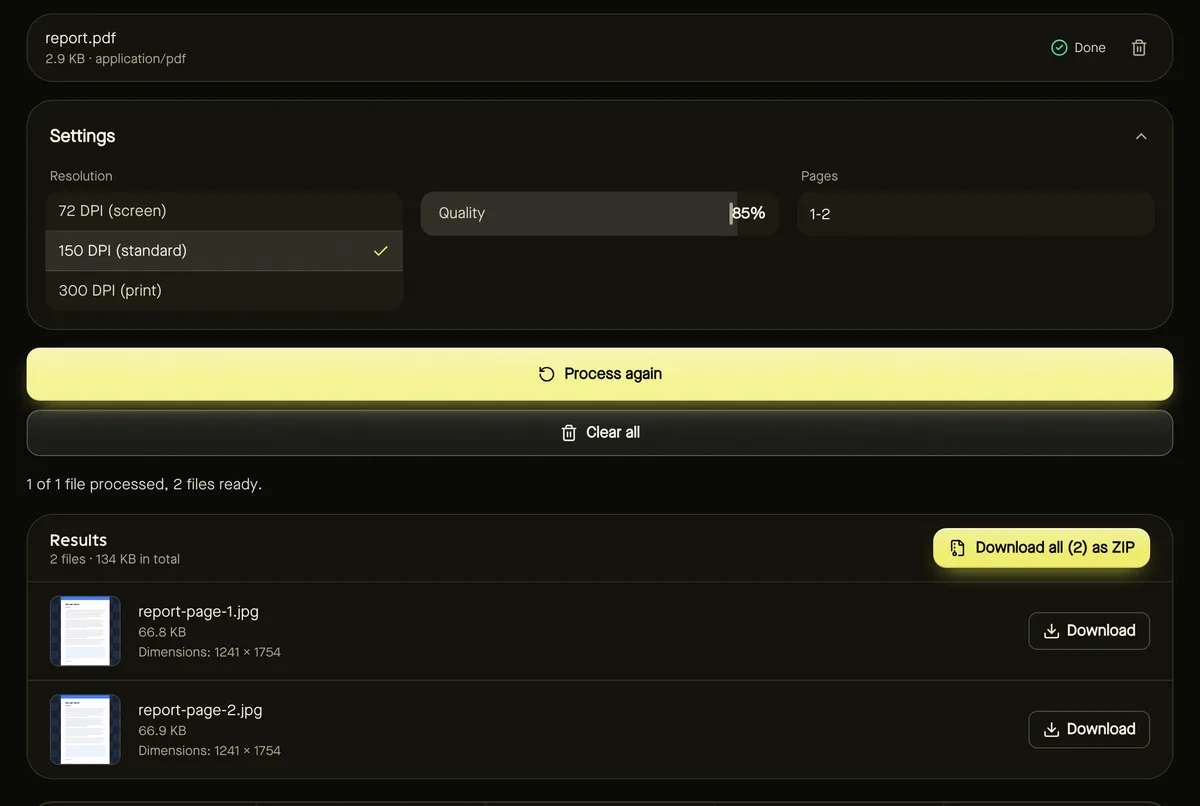
- Step 1: Open PDF to JPG and add your PDF.
- Step 2: Choose 150 DPI — an A4 page becomes about 1240 × 1755 pixels, plenty for a phone screen.
- Step 3: Enter the pages to include, such as 1-8, or leave empty for all.
- Step 4: Click Start and download the images (all at once as a ZIP if you like).
Fit Instagram's shapes
Instagram feed posts have long supported shapes from landscape to a portrait ratio of 4:5 (check the app for the latest options). A4 and Letter pages are taller than that, so Instagram will crop them. To choose the framing yourself, open Crop image and use the 4:5 preset on each page — keep the most important content in frame.
Resize and post
Instagram displays images at around 1080 pixels wide, so larger images are scaled down on upload. Resizing to 1080 pixels wide with the Bulk image resizer keeps files small and gives you control over sharpening. Then create a new post, select multiple images in page order and publish.
Make text readable on phones
- Use large text — slides designed for presentations translate better than dense reports.
- Split busy pages into two images, each cropped to one half.
- Lead with a strong cover page that tells people to swipe.
Other platforms
The same images work for other social networks and messaging apps. For LinkedIn, which accepts document uploads directly, you might post the PDF itself — compress it first if it's large.
Frequently asked questions
Why 150 DPI and not 300?
Phone screens don't need print resolution. 300 DPI only makes files larger before Instagram scales them down.
How many images can a carousel have?
Instagram allows multiple images per post; check the app for the current maximum.
Is my PDF uploaded here?
No. Pages are rendered to images in your browser.