Last updated · 2 min read
How to split a PDF into separate pages or page ranges
Sometimes you only need part of a PDF: one chapter of a report, the signed page of a contract, or each invoice from a combined statement. Splitting gives you exactly those pages as separate files, without changing their content.
Three ways to split
| Mode | Result | Example |
|---|---|---|
| Page ranges | One file per range (or all ranges in one file) | 1-3, 5, 8- → three files |
| Every few pages | Equal-sized chunks | Every 2 pages from a 9-page PDF → 5 files |
| Every page | One file per page | A 12-page PDF → 12 files |
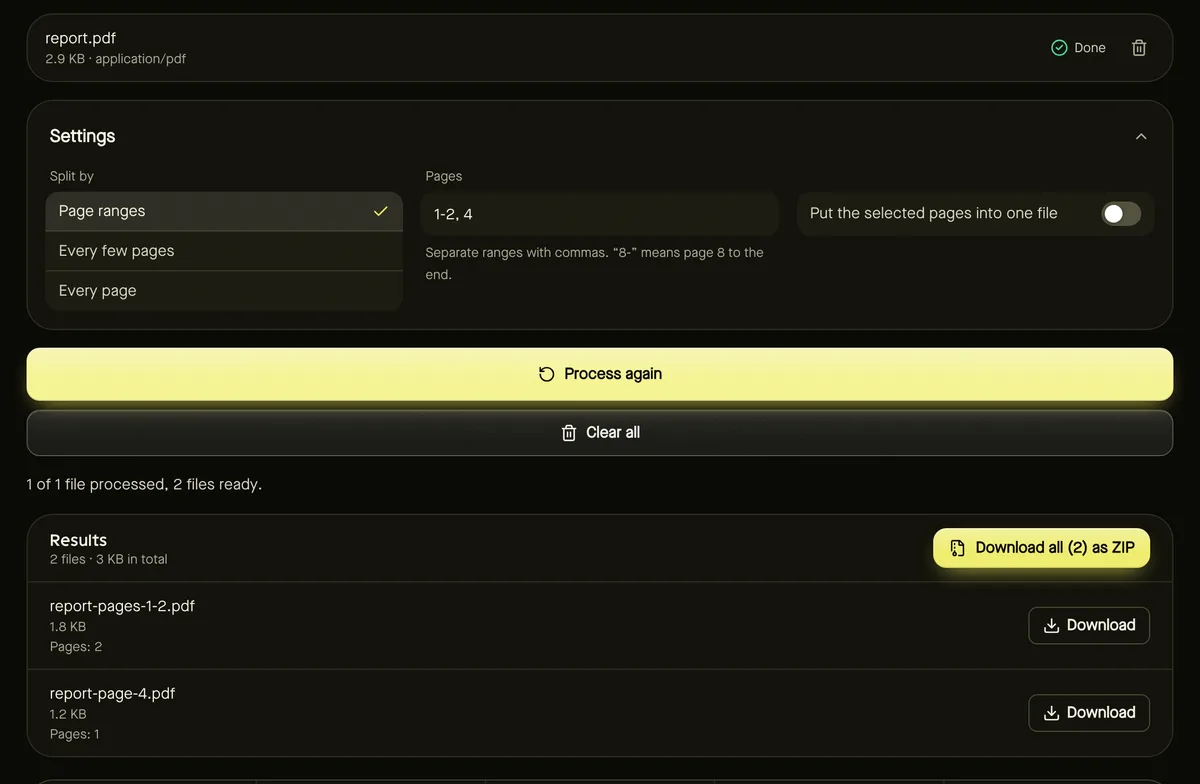
Writing page ranges
- Separate items with commas: 1-3, 5, 8-10.
- A single number is one page: 5.
- Leave the end open to go to the last page: 8- means page 8 to the end.
- Turn on Put the selected pages into one file to extract several ranges into a single PDF.
Split a PDF step by step
- Step 1: Open Split PDF and add your PDF.
- Step 2: Choose Split by: page ranges, every few pages, or every page.
- Step 3: Enter your ranges or the number of pages per file.
- Step 4: Click Start, then download each part or all of them as a ZIP.
Split vs organize
Splitting creates new, separate PDFs. If you want to keep one document but remove, reorder or rotate pages within it, use Organize PDF pages instead, which shows a preview of every page.
To put pieces back together later, use Merge PDF.
Everyday examples
- Send only the signed page of a contract: use a single page number, such as 7.
- Separate a combined statement into monthly invoices: if each invoice is two pages, split every 2 pages.
- Extract a chapter: enter its page range, for example 12-28.
- Remove the first pages of a scan: enter 3- to keep page 3 to the end.
Downloaded parts are named after the original file with the page range they contain, so they're easy to tell apart.
Frequently asked questions
Does splitting reduce quality?
No. Pages are copied exactly; text and images aren't re-encoded.
Can I split several PDFs at once?
Yes — add several files and the same split settings apply to each one.
Is my PDF uploaded?
No. Splitting happens in your browser.