Last updated · 2 min read
How to compress a video for email, WhatsApp or upload
Phones record video at high resolution and high bitrate, so a minute of footage can take hundreds of megabytes. Most of that is unnecessary for sharing. Lowering the resolution and re-encoding at a sensible bitrate can cut file size dramatically while keeping the video looking good on phones and laptops.
Compress a video step by step
- Step 1: Open Compress video and add an MP4, MOV, WebM or MKV file (up to 500 MB).
- Step 2: Choose Output: MP4 (H.264) for maximum compatibility, or WebM (VP9).
- Step 3: Set Maximum resolution — 720p is a great default for sharing.
- Step 4: Choose Quality: High, Medium or Low.
- Step 5: Click Start and watch the real progress. Download the result when it's done.
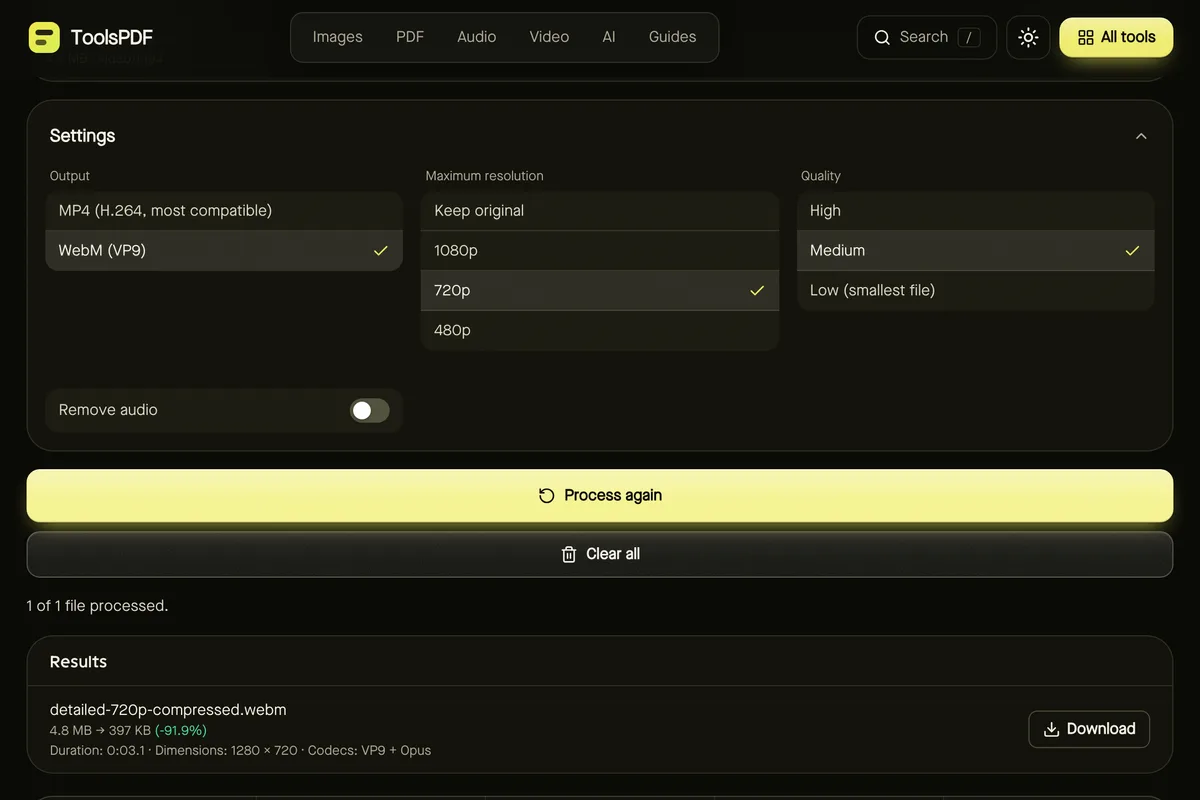
Choosing settings
| Goal | Resolution | Quality |
|---|---|---|
| Email and messaging | 480p or 720p | Medium or Low |
| Sharing that still looks sharp | 720p or 1080p | High |
| Smallest possible file | 480p | Low |
Resolution has the biggest effect on size. A 4K or 1080p phone video viewed on a phone screen looks very similar at 720p, at a fraction of the size.
MP4 or WebM?
MP4 (H.264) plays on virtually every device and app — choose it if you're not sure. WebM (VP9) often gives smaller files and is well supported by browsers and many apps, but some older devices can't play it.
How long it takes, and browser notes
Compression uses your browser's built-in video encoder — often hardware accelerated — so a short clip can take seconds, while longer videos take minutes. Progress is shown as it works, and you can cancel any time.
- Firefox can't create AAC audio, so MP4 output with sound isn't available there: choose WebM, or tick Remove audio. You'll see a clear message if this applies.
- Output is kept in memory until you download it, so very long videos may not fit on older phones.
Other ways to save space
- Only need a few seconds? Make a GIF for short loops.
- Only need the sound? Extract the audio as MP3.
Frequently asked questions
Will compression reduce quality?
Some detail is lost, but at 720p with High or Medium quality most viewers won't notice on phones and laptops.
Can I keep the original resolution?
Yes — choose “Keep original” and adjust quality only. Savings will be smaller.
Is my video uploaded?
No. Encoding happens in your browser using its built-in codecs.