Last updated · 2 min read
How to add a watermark like CONFIDENTIAL or DRAFT to a PDF
A watermark tells readers at a glance how to treat a document: DRAFT, CONFIDENTIAL, COPY or SAMPLE. Adding one takes a few seconds, and a light, diagonal watermark marks every page without getting in the way of reading.
Add a watermark step by step
- Step 1: Open Watermark PDF and add your PDF.
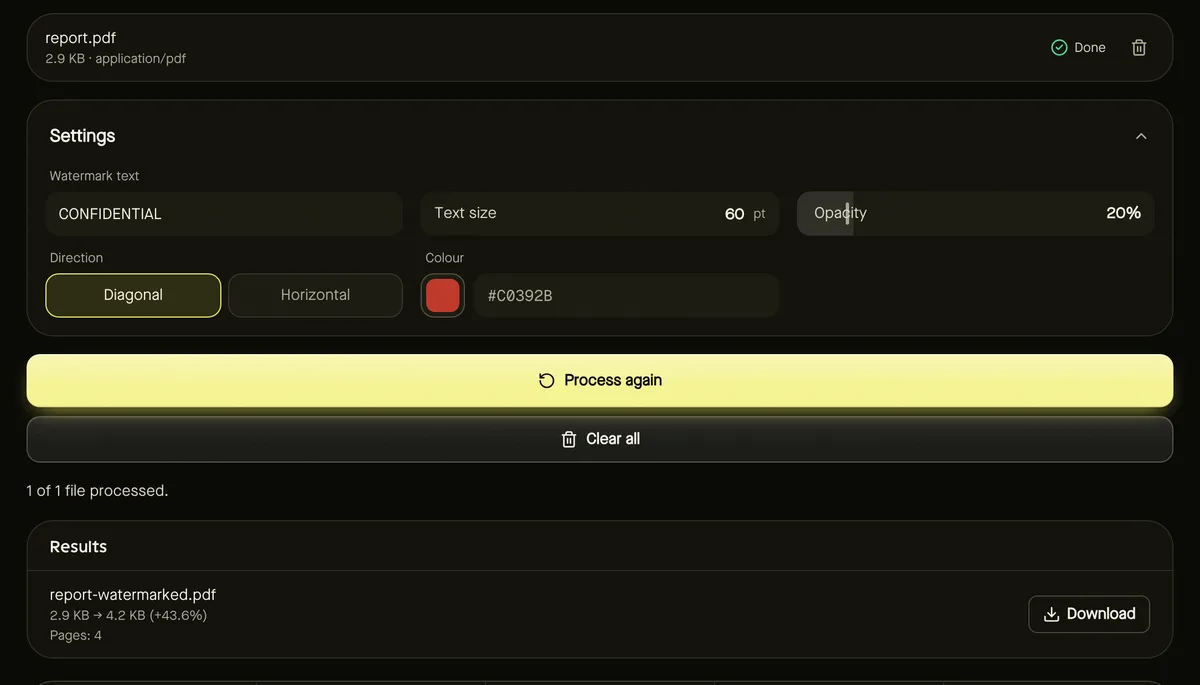
- Step 2: Type the Watermark text — up to 60 characters.
- Step 3: Set Text size, Opacity, Direction (diagonal or horizontal) and Colour.
- Step 4: Click Start and download the watermarked PDF.
Settings that look professional
- Opacity 15–25% keeps the text underneath easy to read.
- Diagonal placement is the classic look and is harder to crop out than a header line.
- Size 50–80 pt suits A4 and Letter pages; use smaller text for short words on small pages.
- Red or grey are conventional; match your brand colour if you prefer.
The watermark is centred on every page and placed correctly even on pages that are rotated.
Which characters can I use?
The watermark uses a standard PDF font that covers Latin letters, accents, digits and common punctuation. Text in other scripts is refused with a clear message rather than producing missing characters.
What a watermark protects — and what it doesn't
A watermark is added as text on each page. It clearly labels the document and discourages casual reuse, but it isn't a security feature: anyone with a PDF editor could remove it. For truly sensitive documents, control who receives the file.
Common watermark wording
| Text | When to use it |
|---|---|
| DRAFT | Work in progress that may still change |
| CONFIDENTIAL | Documents for a limited audience |
| COPY | Duplicates of an original document |
| SAMPLE | Previews of templates, reports or products |
| Company or person name | Showing who a copy was issued to |
Short words work best: they can be large and still fit diagonally across the page. Several documents can be watermarked in one go with the same settings.
Frequently asked questions
Does the watermark appear on every page?
Yes, on every page, centred, at the same size and angle.
Can I use an image or logo as a watermark?
Not yet — the tool adds text watermarks.
Is my PDF uploaded?
No. The watermark is added in your browser.